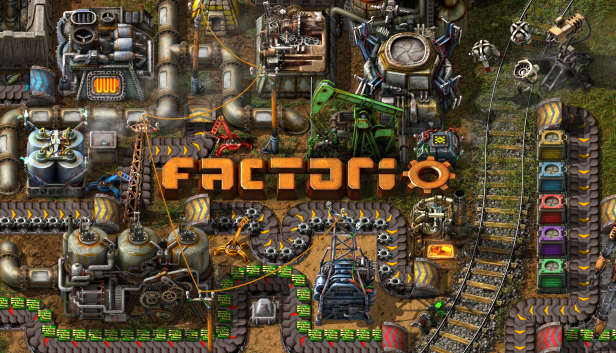
A long time ago, in FFF-191 I wrote about improving the GUI. Well, things are finally starting to move, so this week I'll bring you an update on that. We even have a GUI team: Twinsen(me): UX and programming Albert: UI, graphical design, layouts, mockups, UX Rseding91: main programming and GUI internals The plan is to go through the entire game's GUI (including main menu, all entity GUIs and all game windows) and improve it both visually and interaction wise. This is quite a huge undertaking because: Factorio's interactions are quite complex If you count all the entity windows and panels, we have about 120 windows to go through in the game. Mods can change many aspects of the game so we have to account for that to make sure windows still look good and are still easy to use: e.g. having 15+ recipe categories, having assembling machines with 20+ module slots, having recipes with 20+ ingredients, having players with 200+ inventory slots, etc. Many players are already used to interacting with the game in a specific way, so any major changes are hard to make. Our GUI back-end (heavily modified AGUI) is not exactly well written, programmer-friendly, or feature-rich. Many of the features and polishing we want to add were not done previously due to their programming complexity. At the moment we are still early in the project, just defining the style and the concepts. During the next months, I'll try to make a series of FFF talking about the improvements we are making (starting with this one) so you can see how the project progresses, and offer feedback along the way. Everything I mentioned in FFF-191 will be there, but we have even more cool improvements coming to the toolbar that we are working on, so today I'll talk about something else: the new train/locomotive GUI. Disclaimers: Everything you see are mockups made by Albert and are not from the game, but we will try to make it look almost identical in game. The style (colors and look) is not final. This is the 3rd iteration and Albert is still experimenting with making everything look nice. The purpose of these mockups are mostly to define the layout and interaction. This is how the new Locomotive GUI will look. As you notice, apart from the style changes, they way the stations and conditions are shown is very different, but I'd say much more intuitive, informative, and easy to use. Let's go through a short use case. You click add station and the list of stations appears. You can add a station by clicking on the station in the list or by clicking it in the small map. The map can be zoomed and moved around so you can easily find your station. Also, as you hover over stations in the list, the map will show their location. The stations marked differently are unreachable from the train's current position. This way you can more easily recognize and possibly ignore stations outside of the current network. Once you click a station, it is added to the schedule, along with a default condition. You can continue adding more stations, or add/edit the conditions for the new station. Finally a schedule can look something like this. The path of the train will be shown. We will try to paint the path the train is taking at the moment, it will change as the train takes different paths. The fuel can be accessed from the separate tab and the color of the locomotive can be changed using the color picker. The buttons in top of the map, from left to right are as follows: Turn station names on or off. Change the angle of the station names. Switch to map view. Switch to camera view. Center view on the train. The small 'info' button you see on the right side will be a help button we will use throughout the game to help explain how different GUI work and when their elements mean. We will write more about this in some of the next parts of the FFF GUI update series. We also want to add a neat tool for advanced players. Control-clicking on any point on the locomotive's map (or any station) will add a 'Temporary stop' to it's schedule. The train will try to go as close as it can to that point, wait a few seconds and finally automatically remove the 'Temporary stop' from it's schedule. This is very useful for quick transportation. It also allows you to quickly 'hijack' an existing train and use it to get somewhere, since the 'Temporary stop' will be deleted and the train's normal schedule will be resumed. Another quality of life improvement will be a game option to automatically add some fuel from the player inventory when building vehicles (car, tank or locomotive), making rail transportation as simple as placing a locomotive on a rail, entering it and control-clicking where you want to go. We hope you like the proposed changes. No doubt things will change as we implement and playtest these changes, but we thought it would be interesting to show you an early preview. Finally the million dollar question is when will this be in game? Because it's quite a bit of work we already pushed the GUI update to 0.17. On the bright side, this mean 0.16 will come a bit sooner. Let us know what you think by commenting in our usual topic at the forums.

Hello, last week you've seen how Gleba looks, it's time to get a glimpse of what you can do there. With the idea of being a biological planet full of life, it seems reasonable to expect our engineer is about to harvest some of that. We already have ways of harvesting nature, specifically trees. On Nauvis we either just hit them with an axe enough times, or later our construction robots take care of that friendly forest devastation. These tools aren't quite up to speed to be a part of a mass-production chain in our factories, though... Both of the Nauvis methods are initiated manually so not the best for automation, and the trees don't grow back - so once an area has been harvested, you need to move your operation further.
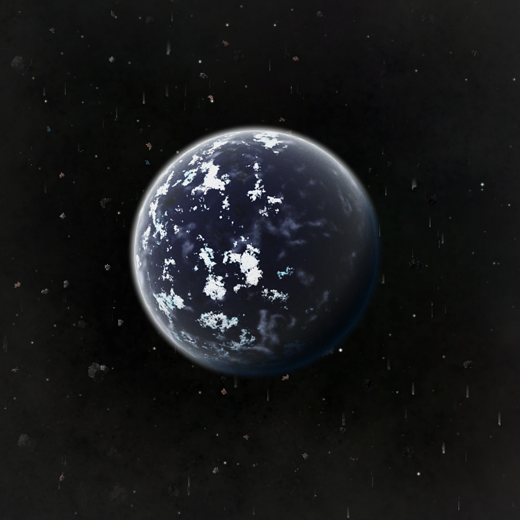
Hello, It's time to reveal the last planet. So. Warning: Spoilers ahead.
Lua Mod GUI additions Rseding Mod GUIs have been an interesting part of Factorio modding since I started working at Wube. They allow scenarios and mods to add GUIs that look and feel like the base game. When someone new to Factorio modding is introduced to how they function, they almost always have the same questions: Why is mod GUI part of the game state? Why do mod GUIs need to be deterministic? How can I edit the base game GUIs? And then comes the explanation: The actual widgets are not part of the game state and are not deterministic. The part that mods have access to however is. In an environment where mods have to operate deterministically, if a mod is allowed to read some data that data must be deterministic. In that simple bit of logic; if a mod can read the checked state of a checkbox then that checked state needs to be deterministic. If the mod didn't have access to read that state it would need to store the last-known state and update it every time it got the changed event. Try to imagine that: every single mod implementing their own system for remembering last-known-state about GUIs they're using. Instead of leaving that entire mess to mod developers we decided long ago that we would manage that "last-known-state" for them. The basic data about what a given mod wanted to show on screen is recorded so mods can read and change it as they want and not need to be concerned with constantly updating it every time some changed event happens. Additionally it means that the game can use that "last known state" to restore what the player sees if they save, quit, and load the game. That still leaves the last question: "How can I edit the base game GUIs?". Using the above example it's much easier to explain that: as a mod - you can't. The base game GUIs are not implemented using this same system - they're just pure collections of widgets. None of the "last known state" is saved anywhere and it's all lost when saving, quitting, and loading. However, that leaves a divide: we need to implement each widget type through the "CustomGui" system in order for mods to be able to use them. With this latest release I finally figured out a way to do tabbed panes since they're special in how they work compared to everything else. Additionally I figured out a semi-friendly way for mods to put things directly on the screen in a way that the player can drag them around - instead of being limited to some fixed area (left, top, center, etc). Another system which I've been thinking about for quite some time is some way for mods to position GUI elements relative to base game GUIs. For example: a mod wants to add a pane which shows on the left of the character inventory GUI. Currently it's not possible - the base game GUI isn't readable by mods so they can't do anything with it. My idea is some system where a mod can say "I want to add this GUI, and I want it to be shown relative to the character GUI on the left side" and then any time the character GUI is shown it would also show the mod GUI. There are some critical parts to this new system. It needs to: Be easy to expand (either automatically works with all new base game GUIs or works with minimal effort). Not break with simple refactoring. Not cause other programmers trouble by existing. Not prevent base game GUIs from working how they need to work. So far none of it seems impossible. I don't know when I'll have it working, but I'm looking forward to what mods will do with it.

Hello! Welcome to Fearghall's Factorio Friday Facts! (FFFF, if you will.) Over the last few months, you have seen asteroids a few times as a background part of some other FFFs, but for all their understated majesty, they were actually quite a complicated trick to pull off! Come with me as I take you on a 3720 to 1 journey through this asteroid field.
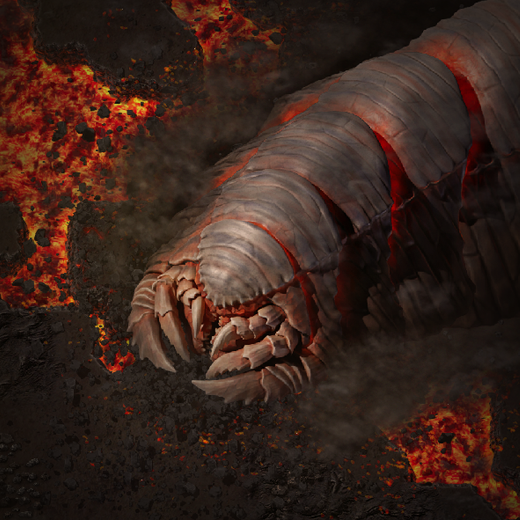
Hello, Welcome back to Vulcanus. It's been a while. You place your new prototype big mining drills, the pinnacle of resource extraction technology, on the closest tungsten deposit to your fledging Vulcanus factory. A few power poles later and they are happily mining away providing a new consistent source of valuable tungsten. A rail ramp and station just about fit in the area too, but without any rail supports in your inventory that line isn't going anywhere soon. Transport belt will have to do for now. As you're returning to the main factory, placing transport belt to connect this new resource to your base, you feel a trembling from the ground. Big mining drills make a lot of vibrations, but this is on a whole other level. Something else must be going on. You head back towards the mining site. Across a river of lava you see a truly gargantuan creature snake its way around a volcano. This formidable beast most closely resembles a centipede or millipede but is larger than a train. As it moves forwards the ground at its face is broken apart leaving a trail of torn up rock and patchy lava. Trees, rocks, even cliffs are torn apart by its passage. Ash is flung into the air making an abrasive cloud that blankets its body and lingers long after it has moved on. The creature roars and speeds up. As it does so it starts shaking the ground harder. Rhythmic vibrations agitate a wide area around it kicking up a huge cloud of ash and destabilising the terrain. Also available on YouTube in 4k. The creature cruises over the lava river and demolishes your machines without even slowing. Your precious new mining drills that seemed so large and powerful just moments ago look like puny toys in the face of such an unfathomable beast. The Demolisher continues its path of destruction down the line of transport belt toward your base, but before getting there it slows to a crawl and turns back into the volcanic wastelands. This attack won't go unanswered. It's time for a fight. You pursue the Demolisher, an easy task given its thick glowing trail. Lava on either side of you forces you to cross through the trail to pursue the creature. The torn up terrain is hot, but there are enough cool rock sections to step across it. As you do, the lingering ash cloud around it obscures your vision and the abrasive particles interfere with your exoskeleton equipment. You catch sight of the body again, this time up close. The thickly armoured plates of each segment seem to give it good protection from heat, and probably many of your weapons. It hasn't reacted to you yet, perhaps it has not seen you, or perhaps it does not care. You move towards the Demolishers head and it still ignores you. The face appears to be a clear weak spot. It has no eyes and the skin still seems adapted for the heat, but the armour is much thinner around the jaws. Bracing yourself for a reaction, you shine your lasers at it's face, but nothing. It continues to patrol some path, as though you were nothing but a speck of dust on the wind. A rocket to the face would surely provoke it, but before testing that theory, you place a line of land mines to secure your retreat. There's an immediate reaction from the creature. It speeds up and turns towards you. Once again, rhythmic vibrations shake the terrain and generate a steadily expanding cloud of ash. The cloud quickly encompasses you. Obscured vision and snagged exoskeleton joints will limit your speed. You fire your submachine gun at the creature. Your piercing rounds cut into the Demolisher and do some damage, but by the time you reload a new magazine all the damage you dealt has healed back. You try again for a few moments inflicting some damage, but again, it seems to heal faster than you can deal damage. Vibrations coming from the creature seem to focus and amplify around you destabilising the ground even more. The crust is thin at the best of times and this isn't helping. A fissure starts to open up under your feet. You manage to dodge to the side as a volcanic eruption explodes in the area you stood a moment ago. Rock fragments, lava, and hot gases shred the area. You avoided the main blast, but just being close to the edge was enough to weaken your shields. New fissures start to open up around you. These are easier to dodge now that you know to look for the fissure signs in the ground. Standing far enough from the eruption is completely safe but you'll need to stay on your toes. The Demolisher ploughs through the line of land mines and does not slow as it does so. They do more significant damage, but to your horror the damage is gone in seconds. That was your escape plan, it's time to get moving. You try some more weapons as you move away, even throwing a few spare defender capsules into the mix. They're all somewhat effective but the damage doesn't stick. You'll need to deal damage much faster but you weren't prepared for that. While distracted you fail to dodge a new volcanic eruption. The fissure erupts directly beneath, shattering your shield and blanketing you in fire. The power armor stops you from getting too singed but another hit like that would be certain death. For now, this is not a fight you can win. You switch all your focus to dodging the eruptions and moving away. A few seconds after you stop firing the Demolisher slows down and turns back. That's two wins for the Demolisher, but you'll live another day.
Hello there, not much has been happening in the past two weeks or so in the Factorio land. We took the time to go for vacation and recharge our energy after months of work. But now we are back. The work on the 0.7 release is in the full speed. This release will be mainly aimed at improving the combat and the enemies behavior. Apart from doing regular developer work we will also soon start the preparations for the Steam Greenlight campaign. We plan to begin the campaign in the matter of weeks. The biggest challenge will probably be making a new trailer. The old one is rather obsolete by now. Once the trailer is ready we will also do some more marketing trying to raise awareness about Factorio at gaming blogs. Interesting things ahead. Stay tuned.
After a lot of work we have managed to release the first version of the demo. It is not graphically complete and there might still be bugs and issues, but we nevertheless decided to make it publicly available. Go and get it. The demo consists of a 3-level demo campaign which teaches the basic game mechanics, controls and concepts. Together with the demo we made alpha version of the game available 'per-request'. The alpha version contains 2 additional campaign levels, freeplay mode and map editor. On top of that there are many more game elements which are disabled in the demo (different inserters, assembling machines, faster transport belts, solar panels, weapons, etc.) If you liked the demo and would like to try the alpha version let us know by email. We wish you all the best in 2013 and we will work hard to bring you Factorio as soon as possible.
Hello everyone, Just a very short post. We, the Factorio team, would like to wish you all very Merry Christmas. Take the opportunity to have some rest and recharge your energy (we certainly will). We have also prepared a small present for you. It is a never-before publicly released prototype of the game from the autumn 2012, so it is more than a year old. It is from so long ago that the game was not yet called Factorio. At that time we provisionally called it Energycraft. There are only the win32 and win64 binaries available (you can use emulator on other systems). Bundled with the game are 2 saves from that time, so you can have a look at some existing factories. Playing that version even for couple of minutes brings back a lot of nostalgia:) Merry Christmas everyone! If you wish to leave some comments you can do so on our forums.
Hi guys, we are still busy working on the 0.7 update, but in the meantime here is a little news on our youtube channel: We have had a youtube channel for a while. You can have a look. However there hasn't been that much activity. Actually main reason for that is rather funny. The account was connected with my personal email address. After a while we figured out it would be useful to use some common email address so the other members of the team can manipulate the channel as well. It turned out that it was not possible to change the email or even migrate the videos to a different channel. So we were sort of stuck with a channel with quite some content already, but one that couldn't be used in a longterm. However recently the situation has changed. Youtube has allowed connecting the account to a Google+ page which can be administred by multiple people. So effectively we got what we wanted - our youtube channel with the original content, that can be controlled by different people on the team. This is a new motivation for us to produce videos now and then. We have started by making a new video about one of the scenario pack campaigns - the Tight spot. Have a look at the video and let us know what you think;)
